
Playlist imports
Imported playlists are separate from flows.
- They do not regenerate from flow settings.
- Spotify, Last.fm, and ListenBrainz imports can synchronize on their own schedule.
- They do not use source mix, focus filters, or deep dive.
- Synced imports keep their playlist membership equal to the provider.
- JSON imports keep the exact imported tracklist.
- They can reuse completed Aurral tracks or existing Lidarr files when worker settings allow.
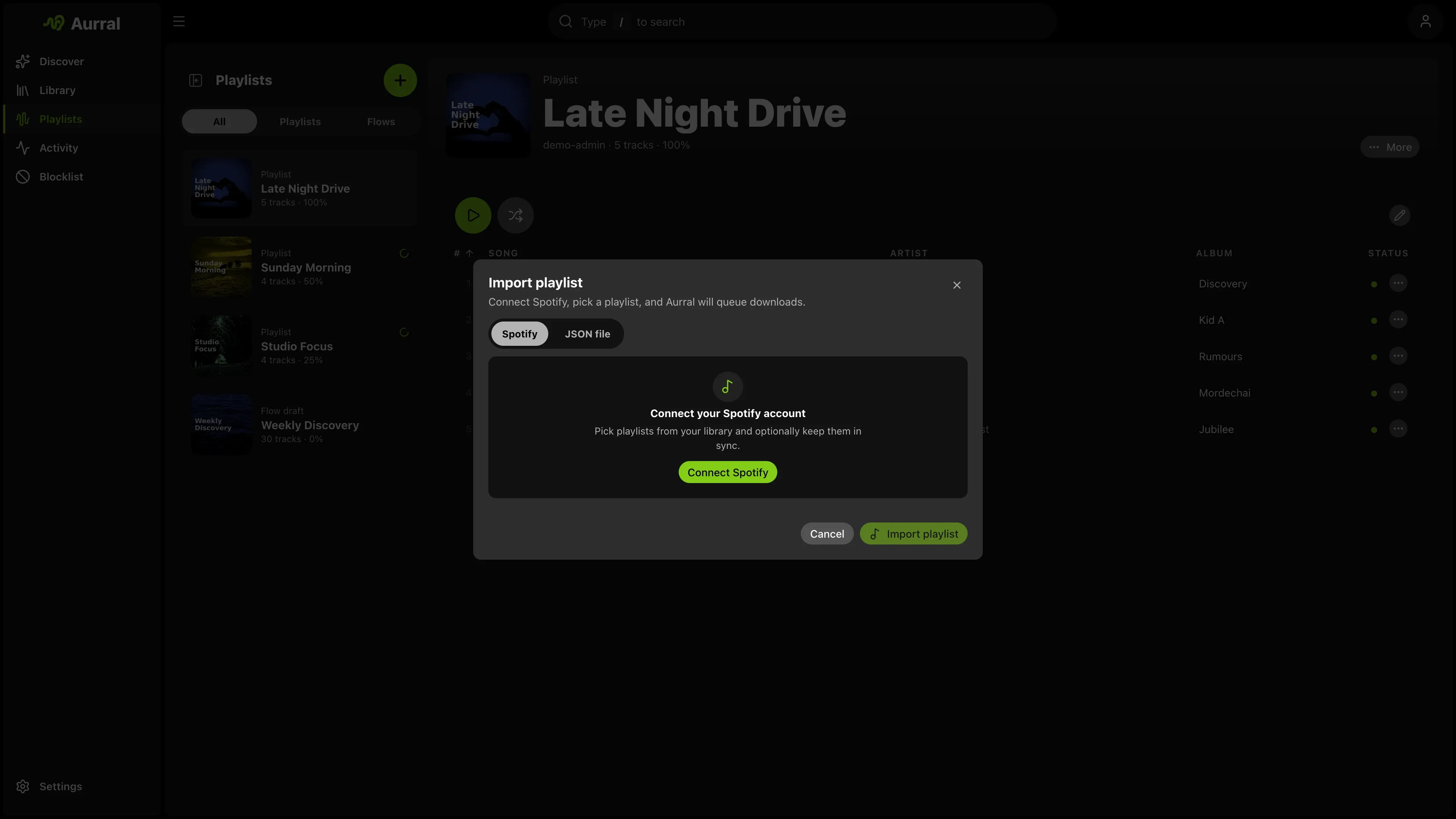
Spotify import
Section titled “Spotify import”The fastest path is in-app import on Playlists.
- Open the create menu.
- Select Import playlist.
- Select Spotify.
- Select Connect Spotify.
- Approve access in the pop-up window.
- Select a playlist.
- Start the import.
You can set a display name and a synchronization schedule. Synchronization gets the Spotify tracklist again, removes tracks that are no longer there, and queues new tracks, so the Aurral playlist count follows Spotify.
By default, a track removed from Spotify is removed from the Aurral playlist but its downloaded file stays in the library. Turn off Keep removed tracks in library when importing, or from the playlist menu, to delete an Aurral-owned file when it is no longer used by another playlist. Lidarr or other external files are kept. This setting applies to future Spotify syncs.
Choose None for a fixed tracklist. You can change the schedule later from the playlist menu.
Aurral stores the connection for each user. Use Disconnect in the import modal to revoke access. If Spotify expires or revokes the connection, Aurral disconnects it and asks you to connect again.
Allow the OAuth pop-up window if your browser blocks it. The Aurral origin must provide oauth.html.
Last.fm import
Section titled “Last.fm import”The Last.fm tab offers three current stations: Library, Mix, and Recommended. If Last.fm is selected as your listening-history provider in your profile, Aurral reuses that username. Otherwise, enter your Last.fm username in the import modal. Aurral saves the username with the imported playlist for future syncs.
- Open the create menu.
- Select Import playlist.
- Select Last.fm.
- Enter your username if Aurral does not find it in your profile.
- Select a station.
- Start the import.
Last.fm syncs fetch the current station again, so a synced Library, Mix, or Recommended playlist follows Last.fm as it changes. Choose None for a fixed tracklist. Keep removed tracks in library works the same way as Spotify and ListenBrainz imports.
ListenBrainz import
Section titled “ListenBrainz import”Link ListenBrainz in Settings > Playback before you import a playlist. Aurral uses the ListenBrainz user token you already use for scrobbling.
The import menu lists your owned playlists and two current generated choices: Weekly Jams and Weekly Exploration. Dated recommendation snapshots from Created for you are left out of the menu.
- Open the create menu.
- Select Import playlist.
- Select ListenBrainz.
- Select a playlist.
- Start the import.
Weekly Jams and Weekly Exploration are selectors rather than dated playlists. Aurral resolves the newest matching ListenBrainz playlist when it previews, imports, or syncs, so their schedule follows future generated playlists. Other owned playlists sync the specific playlist you selected. Choose None for a fixed tracklist. All ListenBrainz imports support Keep removed tracks in library.
Manual CSV import
Section titled “Manual CSV import”When OAuth is not an option:
- Export the playlist from Exportify.
- Convert the file with the Spotify CSV converter.
- Import the JSON file on the JSON file tab.
You can also use CSVJSON. Aurral accepts its output directly and understands Spotify-style keys like Track Name, Artist Name(s), and Album Name.
What the importer accepts
Section titled “What the importer accepts”The importer accepts these JSON shapes:
- An exported Aurral playlist file
- A single playlist object with a
tracksarray - A raw array of tracks
- A bundle object with a
playlistsarray - A nested
{ "playlist": { ... } }wrapper
Required track fields
Section titled “Required track fields”Each track must include:
artistNametrackName
Accepted aliases:
| Field | Accepted keys |
|---|---|
| Artist | artistName, artist, artist_name, Artist Name(s) |
| Track | trackName, title, name, track, Track Name |
| Album (optional) | albumName, album, Album Name |
| Artist ID (optional) | artistMbid, artistId, mbid |
Minimum shape:
{ "artistName": "Burial", "trackName": "Archangel"}Accepted JSON examples
Section titled “Accepted JSON examples”Exported Aurral playlist file
Section titled “Exported Aurral playlist file”{ "type": "aurral-static-tracklist", "version": 1, "exportedAt": "2026-03-25T12:00:00.000Z", "name": "Late Night Finds", "sourceName": "Friday Flow", "sourceFlowId": "abc123", "trackCount": 2, "tracks": [ { "artistName": "Burial", "trackName": "Archangel", "albumName": "Untrue", "artistMbid": null }, { "artistName": "Four Tet", "trackName": "Two Thousand and Seventeen", "albumName": null, "artistMbid": null } ]}Single playlist object
Section titled “Single playlist object”{ "name": "My Playlist", "tracks": [ { "artistName": "Massive Attack", "trackName": "Teardrop" }, { "artistName": "Portishead", "trackName": "Roads" } ]}Raw array of tracks
Section titled “Raw array of tracks”Aurral treats a top-level array of track objects as one playlist.
[ { "artistName": "Burial", "trackName": "Archangel" }, { "artistName": "Air", "trackName": "La Femme d'Argent" }]Multi-playlist bundle
Section titled “Multi-playlist bundle”{ "playlists": [ { "name": "Warm", "tracks": [{ "artistName": "Bonobo", "trackName": "Kiara" }] }, { "name": "Dark", "tracks": [{ "artistName": "Burial", "trackName": "Near Dark" }] } ]}Nested playlist wrapper
Section titled “Nested playlist wrapper”{ "playlist": { "name": "Imported Set", "tracks": [{ "artistName": "Air", "trackName": "La Femme d'Argent" }] }}Import notes
Section titled “Import notes”- Aurral treats a top-level array of track objects as one playlist.
- Aurral treats a top-level array of playlist objects as multiple playlists.
- If an imported playlist name conflicts with an existing playlist, Aurral renames it automatically.
- Imported playlists queue their own downloads and do not affect any flow configuration.
- Activity > Queue shows the playlist import and its queued tracks immediately, before a worker starts them.
- When existing file reuse succeeds, Aurral immediately marks the imported track as complete.
- Aurral keeps the imported track order in the playlist view and in the Navidrome playlist after reuse and downloads finish.
Download retries and failure behavior
Section titled “Download retries and failure behavior”Imported playlists behave differently from flows when downloads fail:
- Aurral queues each imported track as a separate worker job.
- The active download pipeline can try multiple candidates and configured sources.
- If all options fail, the track stays in the failed state after a restart.
- Choose Re-search missing from the playlist menu to explicitly queue failed tracks again.
- Only flows can generate replacement tracks.
Existing file reuse
Section titled “Existing file reuse”Aurral can use one file in multiple playlists. This prevents a second download of the same file.
Reuse does not change the imported track order. Owned tracks stay in their place in the list while missing tracks download.
If you add a flow track to a static playlist, both playlists use the same file.
When the flow refreshes, Aurral keeps files that the static playlist uses. Aurral then builds the new flow.
Aurral prefers static playlists and Lidarr files. Multiple playlists can use one path.
Before Aurral removes a playlist, it moves the other file references. Navidrome does not show duplicate files.
Lidarr-aware reuse requires Aurral to read the files at the paths Lidarr reports. Mount the same media root at the same container path (for example /data:/data with root /data/music). See Filesystem and mounts.
If Lidarr runs on Windows and Aurral runs in Docker, run Test library access in Settings > Lidarr.
Use the reported path to add a mapping under Settings > Download clients > Remote Path Mappings.
Navidrome must scan the corresponding Lidarr library before Aurral can add a reused track to a Navidrome API playlist. See Navidrome.