
Flows
Flows are dynamic discovery features. They regenerate on their schedule and
download temporary files under _flows in the Aurral root. Aurral can send
their playlist references to Navidrome or Plex without making the files part of
the permanent Library.
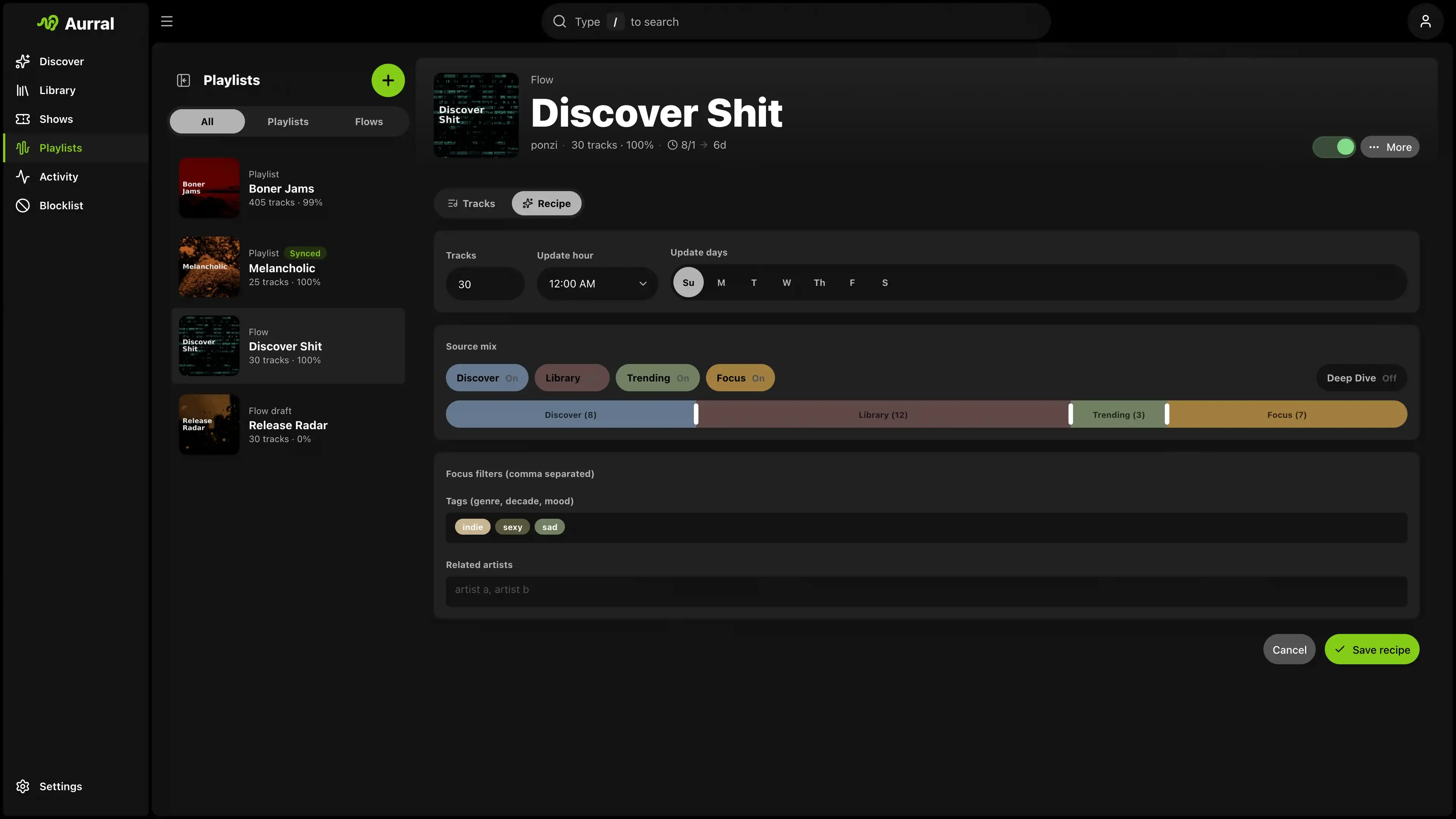
Flow operation
Section titled “Flow operation”A flow has three layers:
- Schedule: when the flow runs
- Source mix: where tracks come from
- Focus inputs: what the Focus source tries to match
Schedule
Section titled “Schedule”- Tracks sets the playlist size.
- Update days selects the days when the flow can run.
- Update hour chooses the hour for those runs.
- A flow starts only when you enable it. A disabled flow keeps its settings but does not run.
Listening history
Section titled “Listening history”Record listening history controls playback from the flow in Aurral’s built-in player. Turn it off to keep the flow out of future recommendations and connected scrobblers. Aurral keeps plays recorded before you changed the setting.
Source mix
Section titled “Source mix”Source mix controls where tracks come from.
| Source | Behavior |
|---|---|
| Discover | Aurral’s recommendation pool. It excludes library and blocked artists. |
| Library | Artists from your library. Only this source can use library artists. |
| Trending | Broader trending pools. It excludes library and blocked artists. |
| Focus | Non-library artists that match your tags. It excludes blocked artists. |
Enabled sources use one mix slider:
- With all four sources on, it behaves like a four-way mix.
- With two sources on, it collapses into a two-way split.
- With one source on, that source takes 100%.
The counts shown inside the slider are the current track targets per source based on the flow size.
Source toggles
Section titled “Source toggles”If you turn off a source, Aurral removes it from the mix. If you turn it on, Aurral adds it back.
Library behavior
Section titled “Library behavior”Only Library can use library artists. Discover, Trending, and Focus always exclude library artists.
If you disable Library, Aurral keeps your focus inputs. Aurral only removes the Library source from the mix.
Deep dive
Section titled “Deep dive”Deep dive changes the track range for each artist. Off uses the top 10 tracks. On uses tracks 10 through 25.
Deep dive requires a Last.fm API key. It does not change the schedule or source percentages.
Focus is a dedicated fourth source. It does not change Discover, Library, or Trending.
- Genre tags tell Focus which genres to target.
- Related artists tell Focus which similarity seeds to target.
- Release year(s) limits Focus picks to a from-to year range. Leave blank for no year limit.
- If you enable Focus, add at least one genre tag or related artist.
- If you disable Focus, Aurral saves your tags, artists, and year range but does not use them.
Year range examples:
1980-1989for a decade2020-blank for that year and later- blank-
2000for that year and earlier
Aurral resolves release years from metadata when needed. Focus tracks without a known year are skipped while a year range is set. Discover, Library, and Trending ignore the year range.
Focus match behavior
Section titled “Focus match behavior”When both genre tags and related artists are present, Focus broadens in this order:
- Artists related to all entered related artists that match all tags
- Artists related to all entered related artists that match at least one tag
- Artists related to any entered related artist that match all tags
- Artists related to any entered related artist that match at least one tag
- Artists related to all entered related artists only
- Artists related to any entered related artist only
- Tag-only artists that match all tags
- Tag-only artists that match at least one tag
Multiple tags or related artists
Section titled “Multiple tags or related artists”Multiple tags use common matches first. For example, acoustic, sad first finds artists that match both tags.
Multiple related artists also use common matches first.
Focus input behavior
Section titled “Focus input behavior”Use commas to separate multiple tags or artists. Aurral converts the text to entries after a comma or after you leave the field.
Aurral ignores duplicate entries.
Fallback behavior
Section titled “Fallback behavior”Aurral tries the most specific matches first. It uses broader matches if it cannot find sufficient candidates.
- Fill each enabled source with its own quota
- For Focus, match the focus request as closely as possible before you use broader matches
- Keep strict one-song-per-artist diversity across the whole run
- Redistribute source shortfalls across the other enabled sources
- Use reserve/replacement candidates if the run still comes up short
Focus does not change the other sources. Use a high Focus value or use Focus alone for a specific playlist.
Aurral uses only enabled sources when possible.
Flow generation behavior
Section titled “Flow generation behavior”When a flow runs, Aurral:
- Calculates the track count target
- Calculates source counts from the current source mix
- Creates a large candidate pool for each enabled source
- Builds a dedicated Focus pool when you enable Focus
- Picks the primary playlist with a strict one-song-per-artist rule
- Redistributes any source shortfalls across the other enabled sources
- Builds a reserve pool from the same run for fast replacements
- Sends the primary playlist into the download worker
Only flows can generate replacement tracks when downloads fail. You can save a completed flow as a static playlist, or promote an individual flow track to the permanent Library from its action menu. See Playlist imports for static playlist retry behavior.
Lidarr import list
Section titled “Lidarr import list”Each flow can publish a token URL for Lidarr Custom List import. Copy it from the flow menu on Playlists. See Lidarr: Import list feeds.