
Library
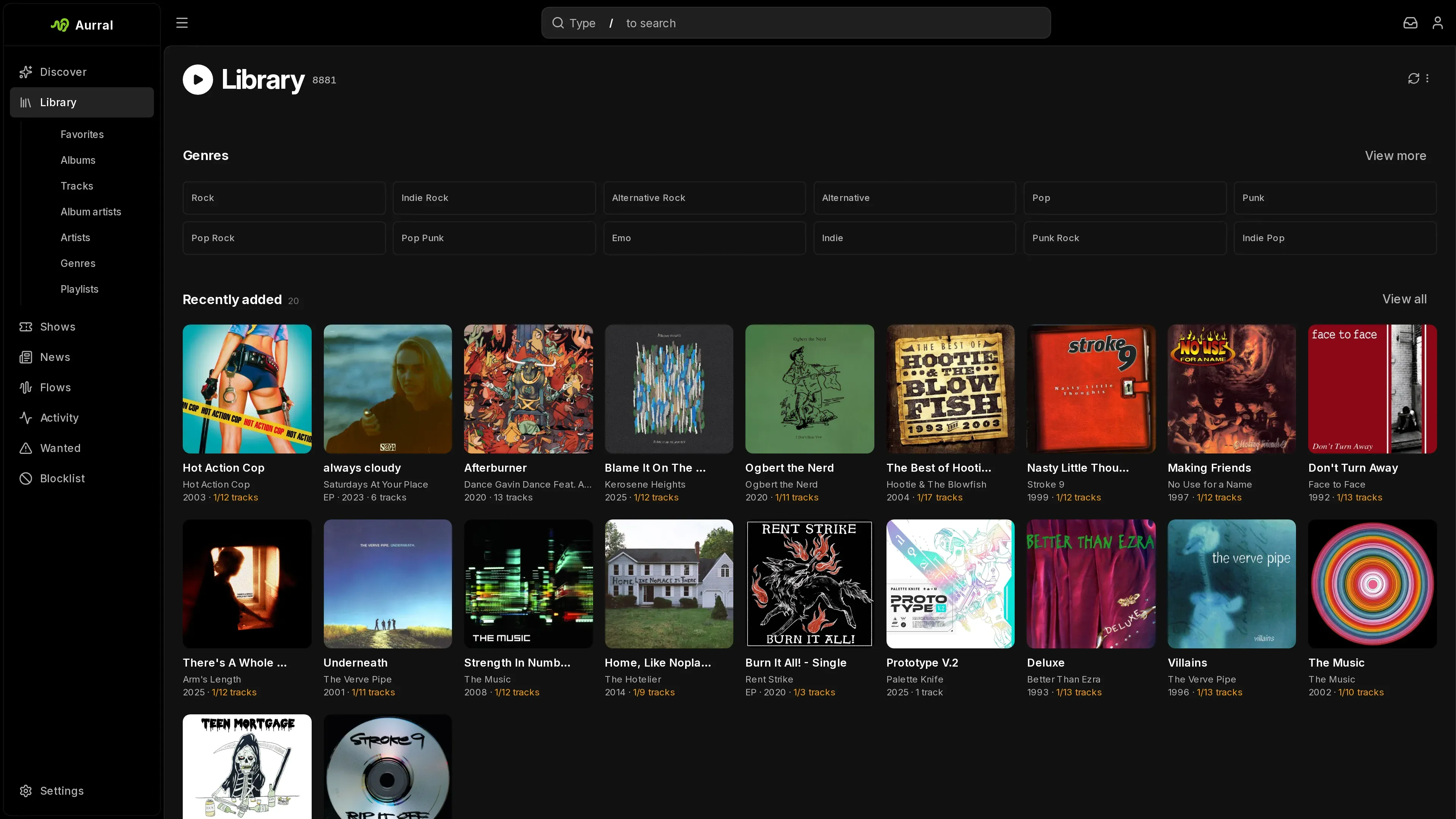
The Library is Aurral’s index of your music. It includes the files in the Library folder, in your read-only folders, and, if you connect Lidarr, in the Lidarr root folders. Open Library in the sidebar to see these sections:
- Library shows recently added albums and a short track list.
- Favorites shows your starred artists, albums, and tracks.
- Albums shows album artwork and how many tracks are available.
- Tracks shows each track, its artist and album, and whether its file exists.
- Album artists and Artists list the artists.
- Genres opens the album list for one genre. A genre tag that lists several genres separated by
;counts under each of them. Other separators such as/and,stay part of the genre name. - Playlists shows your static playlists. Flows have their own Flows item in the sidebar.
To filter the current section, use the search field in the toolbar.
Play and browse
Section titled “Play and browse”Select a track or album to play it in the built-in player. An artist or album page shows its tracks, playback controls, and favorites. An album lists every track of its release, so the tracks you do not have appear dimmed and cannot play. To get them, see Albums and tracks. To see which release an album lists, see How the Library finds new files.
While the player is open, press Space to play or pause, ← and → to move 5 seconds, Shift+← and Shift+→ for the previous or next track, and M to mute. The keys do nothing while you type in a field.
To see what plays next, select the queue button in the player. Drag tracks or use the handle with Space and the arrow keys to reorder them, remove one, or clear everything after the current track. On a phone, the queue is in the Now playing view. Any track menu with a playable track has Play next and Add to queue. When nothing is playing, either one starts the track.
Aurral remembers the queue in this browser. After a reload, the player comes back paused at the same track and time. Closing the player or logging out stops playback, and closing the player also forgets the queue. If you play in a second tab, the first tab pauses.
Each artist and album has a Discover view and a Library view. On a Library page, select Open in Discover to see releases, tags, similar artists, and previews. On a Discover page, select Open in library to go back.
Album artwork comes from your files first: the cover embedded in a track, then a cover, folder, front, or album image in the album’s folder. An album without one shows the artwork from its metadata. When newly added music in Aurral’s own folder has no cover, Aurral saves that artwork as cover.jpg beside the tracks, so apps that read the folder, like Navidrome, show it too. It never replaces an image that is already there. Artists show their photo, or the art of one of their albums. Aurral keeps a copy of each and updates an album’s copy when its tracks change. After you replace an image file beside the tracks, select Clear artwork cache in Settings > Discovery. To pick your own cover, select Change artwork in the album’s menu. For an album in Aurral’s own folder, this also saves your pick as the folder’s cover.jpg and keeps the cover that was there as cover-original.jpg. Removing your pick puts that cover back.
Favorites belong to each user. They work in the built-in player and in Subsonic clients.
To open a track, album, or artist menu, select its options button, right-click it, or press and hold it on a touch screen. Use the track menu to add a track to a playlist or remove it. To see the indexed metadata of an artist, album, or track, select View info in its menu.
The page tells you when library data is stale, when files are partial or missing, when a service has a problem, and when a list is empty.
The Library lists the music you can play, plus the albums Aurral is downloading for you. To see the rest of an artist’s discography and request it, open the artist’s Discover page. When an artist has several releases with one title, each card shows its year, and singles and EPs say so.
On a Discover artist page, you can search releases by title. Filter by all releases, albums, EPs and singles, or compilations. To show or hide live releases in any filter, use the Live albums switch.
Who manages your library
Section titled “Who manages your library”Each artist and album has one manager, Lidarr or Aurral:
- With Lidarr connected, new artists and albums go to Lidarr. Lidarr monitors them and downloads albums into its root folders. Artists and albums that Aurral already has stay Aurral’s, and you can still monitor, search, and remove them. Aurral also downloads the tracks for playlists, flows, and single-track downloads into the Library folder.
- Without Lidarr, Aurral monitors artists and downloads albums and tracks with your download clients into the Library folder.
Lidarr is connected when Settings > Library > Lidarr > Enabled is on and the API key is set. When Lidarr is connected but cannot be reached, Lidarr actions show an error and Lidarr’s music stays in the Library. Aurral does not take over.
The buttons are the same either way. To get an album, select Download album. To get a track, select its + button and choose Add to library. To follow an artist, open the artist’s page and select Monitor. Discover and Search cards don’t add artists. See Artists.
When you connect Lidarr, the music Aurral already has stays Aurral’s. Lidarr takes an album over only when you send it to Lidarr. See Albums and tracks.
Turning Lidarr off
Section titled “Turning Lidarr off”Turning off Lidarr removes Lidarr’s music from the Library. Aurral stops scanning the Lidarr root folders and removes the artists, albums, and tracks it found there. The files stay on disk. Removing the API key does the same.
- Aurral’s own files stay. An album with files in both places keeps its Aurral tracks. The tracks that only Lidarr had stay on the album as missing when you downloaded the album with Aurral or its files have MusicBrainz tags.
- An artist or album that Lidarr managed and that still has Aurral files becomes Aurral’s and starts Not monitored.
- Playlist and flow tracks that used a Lidarr file download again, so that Aurral has its own copy.
- Favorites and play counts come back when the same music returns to the Library.
To bring Lidarr’s music back, turn Lidarr on again and save. Aurral scans its root folders again. To keep Lidarr’s music in Aurral without Lidarr, add its root folder as a read-only folder before you turn Lidarr off. Its music then stays in the Library, and playlists keep using its files. To have Aurral manage that music instead, import the root folder. See Bring your existing music.
Monitor music
Section titled “Monitor music”Monitoring decides what Aurral or Lidarr does by itself. It works at three levels: artist, album, and track. Unmonitoring never deletes files. To remove music, see Remove tracks, albums, and artists.
Artists
Section titled “Artists”An artist’s monitoring decides which of its releases download by themselves. On a Discover artist page, select Monitor and make a choice. The button then shows it. On a Library artist page, the same choices are in the artist’s menu. Every artist starts Not monitored, so you never add an artist first.
- With Lidarr, Lidarr monitors the artist with its own options: All albums, Future albums, Latest album, First album, Existing albums, and Missing albums. Choosing one for an artist that Aurral does not have adds it to Lidarr with your Lidarr defaults. To choose the root folder, quality profile, tag, or monitoring for one artist before it is added, select Customize add… in the menu. If you change an artist’s monitoring in Lidarr itself, the option shows Custom. When Lidarr monitors or downloads an album that Aurral has tracks from, Lidarr takes the album over. See Albums and tracks.
- Without Lidarr, Aurral monitors the artist with its own rules. Aurral keeps monitoring its own artists after you connect Lidarr.
Aurral’s monitoring rules
Section titled “Aurral’s monitoring rules”An artist that Aurral manages is Monitored or Not monitored. A monitored artist follows the default rules, unless you give it its own. To see or change an artist’s rules, select Monitoring rules… in its monitoring menu and turn off Use the default rules. While you change the rules, Aurral lists the releases and top tracks it would download, and what it skips and why. An artist with its own rules shows Custom rules.
An admin sets the default rules in Settings > Monitoring > Default rules. Before a change is saved, Aurral shows how many artists use the default and what it would download for them. A change applies to those artists from the moment you save it.
- Back catalogue takes the releases that are already out: Everything, everything Since a year, the Latest releases, up to 10, or Nothing. It counts what was out when you saved the rules, so Latest releases keeps the same releases when the artist puts out another one.
- New releases downloads the releases that come out after you start monitoring.
- Release types chooses albums, EPs, and singles. Also include adds releases with a secondary type, such as live albums, compilations, soundtracks, remixes, demos, DJ mixes, and mixtapes. Aurral only takes official releases.
- Edition chooses the Standard tracklist or the Expanded edition. See Follow an Aurral album download.
- Top tracks downloads up to 50 of the artist’s most popular songs that its releases don’t already bring. The list comes from Last.fm when you set a Last.fm API key, and from Deezer otherwise.
The default rules take every album and EP and the new releases. Aurral skips a single, EP, or other release when every song on it is already in your Library or on another release it downloads. A studio album is never skipped this way.
After you change an artist’s monitoring, Aurral reports what it queued and why it skipped the rest. If Aurral cannot load the artist’s releases, it tells you and keeps the old rules. Aurral checks the artists it monitors for new releases and top tracks once a day.
Artists that an earlier version monitored with All albums use the default rules. Future albums and Latest album became rules that do the same. Artists on First album are now Not monitored, and the album they downloaded stays monitored.
A Library artist’s menu also has Delete artist. See Remove tracks, albums, and artists.
Albums and tracks
Section titled “Albums and tracks”Downloading something monitors it. When you download an album, Aurral monitors the album and every track on it. When you download one track, Aurral monitors that track only. A monitored track gets everything Aurral does by itself: Aurral downloads it, searches again when it is missing from an album you asked for, and upgrades its file below your quality cutoff. An unmonitored track stays as it is. This includes monitored tracks that Aurral did not download, such as ingested music.
A track can be monitored on its own. A single that a synced playlist downloaded puts its album in your Library. The album is unmonitored, and the playlist’s track is monitored. Files that Aurral did not download, such as music you copied into the download folder, start unmonitored.
With Lidarr connected, Download album on an album that Aurral does not have sends it to Lidarr. Sending an album that Aurral has to Lidarr from Discover or Search hands it to Lidarr. Lidarr then manages the album, and Aurral stops monitoring its tracks. When Lidarr has a track, playlists use Lidarr’s file and Aurral deletes its own copy, unless a playlist on a media server still uses it.
- To get the rest of an album, open its Library page and select the download button next to Add to favorites. On an Aurral album, Aurral looks up the full track list and downloads what is missing. On a Lidarr album, Lidarr searches for it.
- To get one missing track, select the download button on its row. Aurral downloads the track, even on an album that Lidarr manages.
- To stop monitoring an album, open the album’s menu and select Stop monitoring album. This stops monitoring every track on it.
- To stop monitoring one track, open its menu on the album page and select Stop monitoring track. An unmonitored track shows a crossed-out eye. Lidarr cannot monitor single tracks, so tracks whose files come from Lidarr have no track monitoring.
- To keep a file you are happy with, select Keep this file in the track’s menu. Aurral stops upgrading it, including when you ask for an upgrade, and cancels an upgrade that is under way, but keeps monitoring the track. To let Aurral upgrade it again, select Allow upgrades.
If the album or track has unfinished downloads, Aurral asks you to confirm. It then cancels those downloads and keeps every finished file. To monitor something again, download it. When nothing is missing, the menu offers Monitor track or Monitor album instead. An album you unmonitored stays unmonitored when you change the artist’s monitoring later.
Wanted does not list unmonitored tracks. Retry on an album skips the tracks you unmonitored. Re-search on one track still works when it is unmonitored.
Search again for missing tracks
Section titled “Search again for missing tracks”Aurral can search again for missing tracks that you monitor. This is off by default. To turn it on, open Settings > Monitoring and turn on Search again for missing tracks.
Aurral checks once a day and searches every album you asked for that has a monitored missing track whose Search interval has passed since its last search or download. It skips unmonitored tracks. After you cancel an album’s downloads, Aurral leaves that album alone until you select Retry.
Follow an Aurral album download
Section titled “Follow an Aurral album download”A monitored album shows its download state on its page, such as Queued, Downloading, Partially available, or Needs attention. An album is complete when every track you monitor is available.
When the Library already lists the album from your files, Aurral asks for the tracks of that release. Otherwise it asks for the tracklist that most releases of the album share, in the order most of them share. That is usually the standard edition rather than a deluxe edition, a box set, or a pressing that swaps tracks. Aurral remembers the release it asked for. When you download the album again, it asks for the same release, even if your files turn out to be another one, until you change the artist’s Edition.
An album’s page lists the release Aurral downloads for that album: the one described above when the album is in your Library, or else the standard edition. A track you add from the page asks for that release, with its disc and place on it, and goes to that album when another album in your Library also has the track. A playlist you save the track to keeps that release.
Aurral takes tracks from a Soulseek folder, a Usenet download, or a Deezer album only when it holds exactly that release. A deluxe edition with a bonus track, a shorter edition, or a folder with a live version of a song is a different release, so Aurral passes over it. When no source has the release, Aurral searches for each missing track on its own. See Download source priority and fallback. A shorter download does not complete the album. The tracks it lacks stay monitored, and Aurral keeps searching for them.
To get single tracks fast, give yt-dlp a lower Source priority than slskd, Usenet, and deemix. A track you download on its own, or one from a playlist or a flow, then comes from yt-dlp first, so you can listen sooner. If yt-dlp has no match, Aurral looks for the track’s release and then searches the other sources for the track. An album you download never starts on yt-dlp. With Automatic upgrades on, Aurral later replaces a yt-dlp file with a better copy from the release. See Track upgrades.
When the artist’s rules choose the Expanded edition, Aurral asks for the longest edition that keeps every standard track and is at most twice as long, such as a deluxe edition but not a box set. A standard-edition folder does not count as that release. Switching an artist to Expanded also adds the extra tracks of its albums already in your Library. An expanded edition must use the same recordings as the standard tracks, so a remaster with its own recordings is not treated as one.
- To stop unfinished tracks, select Cancel downloads. Finished tracks stay in the Library.
- To search again for cancelled and failed tracks, select Retry.
If no download client is set up, or if tracks wait for review, the album page links to the settings page or the Activity view that fixes the problem. To see where a track’s file came from, select View info in its menu.
Replace a track
Section titled “Replace a track”To look for another recording of a track that Aurral downloaded, right-click the track and select Re-search. The current file stays available until Aurral downloads and checks a replacement. Lidarr tracks do not have this action.
Remove tracks, albums, and artists
Section titled “Remove tracks, albums, and artists”When you delete a track that Aurral manages, Aurral deletes its file. If no other file exists for the track, Aurral also removes the track, and any album or artist that is left empty. If one of several files cannot be deleted, Aurral keeps the track until a later attempt succeeds.
To remove an album or artist, select Delete album or Delete artist at the bottom of its menu. Aurral cancels unfinished downloads and removes it from Lidarr too when Lidarr has it. To also delete the music files, select Delete album files or Delete artist files. Aurral then also deletes the tracks’ lyrics files, and album art and folders that the music leaves empty in the Library folder, and removes those tracks from any playlist that used them. Otherwise the files stay on disk.
- When you delete an album, the artist’s monitoring leaves it out from then on. Deleting a track file also keeps the track out of the artist’s top tracks. To let monitoring download it again, request it yourself or select Allow again in the artist’s Monitoring rules… or in Settings > Monitoring.
- Deleting an album or artist that Lidarr has needs Lidarr. If Lidarr cannot be reached, nothing is deleted.
- Aurral deletes files only in the Library folder. A file in a Lidarr root folder or a read-only folder stays, even when a playlist used it.
Where Aurral keeps files
Section titled “Where Aurral keeps files”Aurral keeps permanent tracks in Artist/Album/Track folders in the Library folder. When Aurral knows a track’s position on the album, it names the file 07 - Title, or 2-07 - Title past the first disc, so the folder lists in album order and a title that repeats on another disc gets its own file.
Flow tracks are temporary. They live under _flows and are not part of the Library, with two exceptions:
- To add one flow track to the Library, select Add to library in its menu.
- To show all current tracks of a flow in the Library, turn on Show in library for the flow. See Flows.
When a Subsonic client favorites a flow track, Aurral adds it to the Library. To turn this off, open Settings > General > Subsonic and turn off Favorite flow tracks.
Aurral stores static playlist membership in its own database. Deleting a static playlist does not delete Library tracks.
How the Library finds new files
Section titled “How the Library finds new files”Aurral keeps the Library in its own database. It scans the Library folder and the saved Lidarr root folders on local disk. A scan reads the artist, album, and track tags, the MusicBrainz IDs, and the audio files. A scan does not ask Lidarr for artist, album, or track data, so Lidarr’s files need MusicBrainz tags to match reliably. See Tag Lidarr’s files.
When a file changes in a watched folder, Aurral scans the changed file or folder. It skips files whose size and modification time did not change. It waits a moment for a move or rename to finish. It ignores _playlists, _staging, _fallback, _flows, aurral-weekly-flow, and hidden folders.
On a new installation, Aurral scans the whole library once. After that, it scans only what changes. It does not run scheduled full scans.
To scan now, select Refresh in Library and choose a scan:
- Quick scan checks every folder, reads new and changed files, and forgets files that are gone.
- Full scan reads the tags of every file again. Use it after you retag files without changing their size or modification time, or when a quick scan does not fix stale metadata. A full scan can take a long time on a large library. It keeps running if you leave the page.
Each album appears once, and each song appears once on its album:
- A file without MusicBrainz tags joins the artist’s album with the same title. When the artist has more than one, it joins the one that lists the song.
- When a file gains MusicBrainz tags, the scan keeps its album and track, with their favorites, play counts, and monitoring.
- A MusicBrainz ID in capitals is the same ID. A MusicBrainz tag that holds another service’s ID, such as a Spotify or Deezer number, counts as no tag. The next scan reads files that earlier versions filed under such IDs again, and their favorites, play counts, and monitoring carry over.
- An album whose MusicBrainz tags credit several artists, such as a soundtrack, is filed under an artist named after the whole credit. It also shows under each of those artists that is in the Library, in Aurral and in Subsonic clients. Deleting one of them keeps the album.
- After each scan, Aurral folds an album that untagged files split off, or that its files left behind, into the album with the same title. Favorites and play counts move with it. An untagged copy of a song the album already has becomes a second file of that song, which Clean up can remove. So does a copy at the song’s disc and track number that is tagged with a recording the album’s release does not list, as when a song was downloaded twice.
- A file without MusicBrainz tags, or tagged with a recording that the album’s release does not list, is the album’s song at the same disc and track number, even when its title is spelled another way, such as “&” for “and”, names a guest, or says it was remastered. A live, remixed, or other version stays its own song. A file numbered another way, such as one disc for a release of several, is the song with its title when no other song or file has that title and the song has no file.
- Aurral removes albums that have no files and that neither you, Aurral, nor Lidarr asked for, such as albums an earlier Lidarr connection listed without downloading. Their favorites and play counts stay saved and come back if the album returns. Albums you asked Aurral or Lidarr for stay, with or without files.
- An album with MusicBrainz tags lists every track of the release your files come from, such as a deluxe edition: the release with most of their recordings, then most of their song titles, then the release they are tagged with, then the standard edition. A recording that MusicBrainz merged into another counts as that one. The tracks you do not have show as missing, with Lidarr on or off. Aurral looks up the release after the scan that finds the album, and again when its files change or are retagged. If the metadata service cannot be reached, the album lists its files until a later scan. An album lists only its files when its release group holds none of them, as when a wrong match tagged them with another album’s release group. Another artist’s release group holds a file only when it lists the file’s recording under the file’s title.
- A song without a file leaves an album when the album’s release does not list it and you did not ask Aurral or Lidarr for the album, such as a song an earlier Lidarr connection listed without downloading. Otherwise it stays as a missing track.
- When a folder that Aurral scans has nothing in it, as when a drive is disconnected, Aurral keeps its music and plays it again when the files come back.
A track shows the performer from its artist tag, such as Owner feat. Guest, and stays on its album artist’s album. Earlier versions showed the album artist. To show the performers of music already in the Library, run a Full scan.
When a scan finishes, an open Library page reloads. Recently added sorting on albums, tracks, and artists and the home page use the time that a file entered the Library, not the release date.
If Discover says that an album is in Lidarr but the Library does not show it, Aurral probably cannot read the Lidarr root folder. Run Settings > Status > Storage > Run checks and fix the Lidarr library section, then select Refresh. See Filesystem and mounts.
When you turn off Lidarr in Settings > Library > Lidarr > Enabled, Aurral removes Lidarr’s music from the Library and stops watching the Lidarr root folders. See Turning Lidarr off.
When a Lidarr root folder is inside the Library folder, Aurral leaves that folder to Lidarr while Lidarr is connected. When the Library folder is inside a Lidarr root folder, the Lidarr scan skips the Library folder.
Aurral tags the music it downloads with the title, artist, album artist, album, year, track and disc numbers, and MusicBrainz IDs, plus its own AURRAL_IDS tag. It changes only those tags. Every other tag, such as ratings, lyrics, ReplayGain, grouping, and cover art, stays as it was. If the file was tagged as a different album, Aurral also removes its MusicBrainz release ID, which belongs to that other album. Aurral writes the tags to a copy beside the file and then replaces the file, so a hardlinked file gets its own copy and the other link keeps its tags.
For music from elsewhere, importing and Clean up Library fill in the tags a file lacks. See Bring your existing music and Clean up the Library. Aurral cannot write tags to WavPack (.wv), Monkey’s Audio (.ape), or fragmented MP4 (.m4a) files, and leaves their tags as they are.
Tag a file yourself
Section titled “Tag a file yourself”When Aurral finds no confident MusicBrainz match for a file, it leaves the file’s tags as they are and says so. The file then stays out of its album, or the album shows its track as missing. To fix it, tag the file yourself with MusicBrainz Picard or another tag editor:
- Back up the file. A tag editor rewrites the file, and a save that fails or is interrupted can corrupt it. Aurral does not check or undo changes made outside it, so the files you edit are your responsibility.
- In Picard’s Options menu, turn off Rename Files and Move Files, so the file stays where Aurral finds it.
- Match the file to the right album and track, and save it.
- In Library, open the Refresh library menu and select Full scan (re-read every file).
The scan matches the file by its new MusicBrainz tags, or by its disc and track number, and the track keeps its favorites and play counts.
Add music Aurral only reads
Section titled “Add music Aurral only reads”To have Aurral see music it should never change, such as a library you organize yourself, add it as a read-only folder. Open Settings > Library, choose the folder under Read-only folders, and select Add folder. You can add as many folders as you like. Aurral scans each one, and the table shows how many tracks it found.
Aurral never renames, moves, tags, upgrades, or deletes a file in a read-only folder, and never writes anything into the folder. To make sure, mount the folder read-only. See Mount a read-only folder.
- The music joins the Library. You can play it, favorite it, add it to playlists, and serve it to Subsonic clients. Discover recommends artists from it like the rest of the Library.
- Aurral manages its artists and albums. They start Not monitored. When you monitor an artist or download an album’s missing tracks, the new files go to the Library folder, and the read-only files stay where they are.
- Playlists and flows use a read-only file in place instead of downloading a copy.
- Delete track file is not offered for a track that has only a read-only file. Deleting an album or artist leaves the read-only files, so their music stays in the Library.
A read-only folder cannot be inside the Library folder, contain it, or overlap another read-only folder. It can be a Lidarr root folder. While Lidarr is on, Lidarr manages that music. When you turn Lidarr off, the read-only folder keeps it in the Library.
To remove a folder, select its remove button. Its music leaves the Library, and its files stay on disk. Playlist and flow tracks that used its files download again into the Library folder.
To hand the music over to Aurral later, so that it can rename, tag, and upgrade it, import the folder and then remove it from the read-only folders.
Bring your existing music
Section titled “Bring your existing music”To have Aurral manage music from another folder, such as an old library, a Lidarr root folder, or ripped CDs, open Settings > Library and use Import a folder. Aurral files the music in the Library folder. To let Aurral see a folder without changing it, add it as a read-only folder instead. Choose the folder and a mode:
- Move moves each file into the Library folder and removes the source folders it empties.
- Copy copies each file and leaves the source folder as it is.
- Hardlink adds each file to the Library folder without using more space. It works only when the folder and the Library folder are on the same filesystem and mount. When it is not available, Aurral says why.
Select Import folder. Aurral reads each file’s tags and files it under the same Artist/Album/07 - Title names that downloads use. The import runs in the background and continues after a restart. Stop ends it after the current file, and files already done stay done. When it finishes, Aurral shows how many files it filed and how many the Library already had, and lists each file it skipped with the reason.
Aurral matches music by its MusicBrainz tags first and by artist and album names second, so music from an artist or album that you already have goes into that artist’s or album’s folder. A file without MusicBrainz tags is also matched by the IDs MusicBrainz gives it, even when Fill in missing tags is off. Folder and file names that differ only in capitals, quotes, or dashes count as the same name. Fill in missing tags, on by default, has Aurral add MusicBrainz IDs, and any missing title, album artist, track and disc numbers, year, and genre, to the Library’s copy of each file it matches to MusicBrainz with confidence. Tags that a file already has never change, and the source file keeps its tags. Aurral never overwrites a file:
- When the Library already has the track, Aurral skips the file as already in the Library. This includes a track the Library has in another file, such as a FLAC of an MP3 you import. With Move, Aurral removes a source file that is identical to the Library’s copy. When other source files are left, Aurral offers to remove them. It checks each one against the Library’s copy again before it deletes it.
- When a file’s tags match a Library track but its length differs by more than 3 seconds, it is a different recording, such as a mistagged demo. Aurral skips it and names the track it matched. Fix its tags and import again.
- When a file is lossless and the Library has the track only in a lossy format, Aurral skips it and says so. To use the lossless file, remove the Library’s copy and import again.
- When a different file already has the name, two files in the folder claim the same track, or a file has no artist or album tag and is not in an
Artist/Albumfolder, Aurral skips it and says why.
After the Library scan finds the imported files, Aurral checks them once more. A filed file that the scan puts on a track the album already had, with the same length, is listed as already in the Library. With Copy and Hardlink, Aurral deletes the copy it filed, and the source keeps the file. With Move, Aurral moves the file back to its source folder and offers to remove it like the other sources.
Monitor decides what Aurral does with the music afterwards:
- None adds the music and leaves it alone.
- Tracks, the default, monitors each imported track, so Aurral upgrades it below your quality cutoff when Automatic upgrades is on.
- Albums monitors each imported track’s album too, so Aurral also downloads the tracks that the album is missing.
Importing never monitors artists, because a monitored artist downloads their albums. Monitor the artists you want Aurral to follow from their Library page. Aurral applies the Monitor choice after the Library scan finds the imported files. From then on, Aurral manages these files. Delete album files and Delete artist files delete them from disk.
When the folder is a Lidarr root folder, Lidarr still points at it. Move takes the files away from Lidarr and breaks its library. Copy and Hardlink leave Lidarr’s files where they are. The same goes for a read-only folder: Move takes its files out of it.
A hardlinked file shares its data with another file, such as a torrent client’s copy. Filling in tags or upgrading gives the Library its own file, so the other link keeps its tags and data. The Library file then uses its own space.
Music that you copy into the Library folder yourself also joins the Library. It keeps its file names until you clean up the Library.
Clean up the Library
Section titled “Clean up the Library”Downloads and ingested music already get Aurral’s names and tags. For music you added by hand, open Settings > Library and select Clean up Library. Aurral moves each file in the Library folder to its Artist/Album/07 - Title name and fills in the tags it is missing, the same way ingest does. Files without a confident MusicBrainz match keep their tags and are listed as skipped. When the metadata provider cannot be reached, files keep their tags and say so, and the next clean up tries again. When it finishes, Aurral shows how many files changed and lists any it left alone, with the reason. Only one ingest or clean up runs at a time.
Earlier versions of Aurral left the disc out of the name, so Clean up also renames tracks past the first disc from 07 - Title to 2-07 - Title. A file keeps the track number from its tags or name when the Library’s album has no number for it.
When two files of one track want the same name, such as after the same folder was ingested twice, Clean up lists the extra one as a duplicate. They are the same recording when their lengths agree within 3 seconds. Aurral keeps the better copy, lossless before lossy and then the higher bitrate, and offers to remove the other. It checks both copies again before it deletes one. When the better copy had another name, it takes the removed copy’s name. Two files of one track whose lengths differ are different recordings, so Clean up leaves both and says so. Files whose tags give different track numbers are different tracks of the album, even when MusicBrainz gives them one recording, such as a run of silent tracks. Clean up and ingest keep both.
Download jobs, playlists, favorites, and lyrics files follow each file, and stay with the copy Aurral keeps when it removes a duplicate. A file that a media server playlist still uses keeps its old name too, until the playlist updates. Favorites, play counts, and monitoring follow a track when its new MusicBrainz IDs change its identity. Clean up never takes a name that another file has, and it leaves Lidarr’s files to Lidarr.
Artists without a MusicBrainz ID
Section titled “Artists without a MusicBrainz ID”Aurral matches Lidarr files to artists by MusicBrainz ID. When a file has no MusicBrainz artist tag, Aurral looks up the artist name on MusicBrainz after each scan. It links the artist when exactly one MusicBrainz artist has that name or alias. When several artists share the name, as with Nirvana or Genesis, it links the one whose discography holds the most of your albums, ignoring edition labels such as “Remastered”. If no artist holds more of your albums than the others, the artist stays unlinked.
Once an artist is linked, each of its albums without MusicBrainz tags takes the MusicBrainz album with its title that has at least half of its songs. The album then lists every track like a tagged album, and the tracks you do not have show as missing. Aurral does not download them unless you ask. Aurral looks up each album once, and again when its songs change or you run a Full scan.
Artists and albums named in another script, such as Japanese, Korean, or Cyrillic, stay apart without MusicBrainz tags. Earlier versions put such artists under one artist and could merge their albums. Run a quick or full scan to split them. Favorites, play counts, and monitoring carry over to the artists, albums, and tracks that split off.
An unlinked artist stays in the Library. Its Discover page can still offer to add or monitor the artist, because Aurral cannot tell that the files belong to that artist.
To fix a wrong or missing link, open the artist menu and select Edit MusicBrainz ID. Paste an artist ID or a musicbrainz.org artist link, or remove the ID. If another library artist already has that ID, Aurral merges the two artists. Later scans keep your choice. You cannot edit a Lidarr artist here. Change it in Lidarr.
Known limits
Section titled “Known limits”- Aurral hands an album to Lidarr only when Lidarr downloads or monitors it. Aurral never takes albums from Lidarr.
- When you remove an album and keep its files in the Library folder, the next full scan adds it back, unmonitored. To remove it for good, delete its files too.
- Lidarr files tagged with a release ID but no release group ID can show up as a second copy of an album that Aurral also has.